A find card for every Mulebuy Spreadsheet purchase, made and kept in your browser
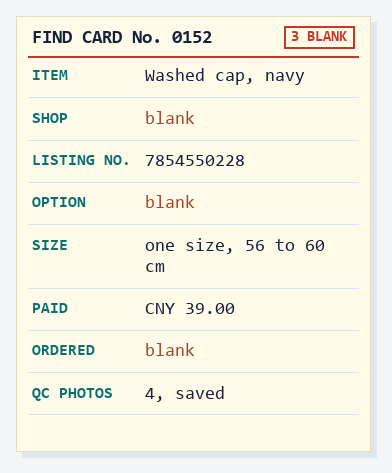
Fill in what you know, save the card, and come back to add the price, the photos, the weight and the parcel as the order moves. Blank lines are flagged with what they will cost you later.
Fill in a find card
Type what you know now and leave the rest blank. The card on the right updates as you go, and the box under it lists every blank line with the reason it will matter later. Nothing you type leaves this browser.
Your card file
No saved cards in this browser yet.
How to use the card maker
Work through it on a real find. Open the catalog entry in one window and this page in another. Fill the first block, the find, while the entry is in front of you: what the item is, its shelf, the marketplace it comes from, the shop name, the listing number and the option text. Paste the option text exactly as the seller wrote it, Chinese characters included.
Press Save to card file. The card gets a number and joins your saved items in the list under the preview. Nothing else is needed until you place the order.
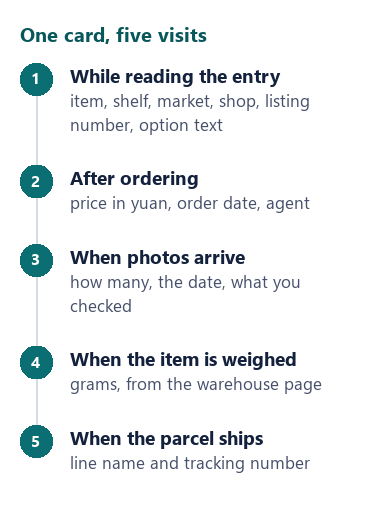
When the order goes through, press Open next to the card and add the price you paid in yuan, the date and the agent. Save again and the card keeps its number. Do the same when the warehouse photos arrive, when the item is weighed, and when the parcel ships. By delivery day the card has every line filled and the blank-line box is empty.
If you only want a record for one find and no saved list, fill the form and press Copy as text. The card goes to your clipboard as plain lines you can paste anywhere.
What each line protects later
Every line on the card answers a question you may have to answer under pressure, usually in a support chat with a deadline running.
Shop and listing number find the seller again when the catalog entry is gone. Option text proves what you chose; if a hoodie arrives in grey and your card says the option you picked was black, the photos and the card settle it quickly. Size and one measurement make the next purchase of the same cut easier, which is where a card pays for itself more than anywhere else.
Paid in yuan and order date are what agents and sellers work from when prices change, refunds are calculated or return windows are counted. QC photos and weight are the warehouse's record of the item, and having your own copy matters if the agent's site stops loading. Parcel is where every delivery question starts.
A card with blank lines is still useful. The point of the blank-line box is to show which gaps are cheap to fill today and expensive to fill in a month.
Where your cards are kept
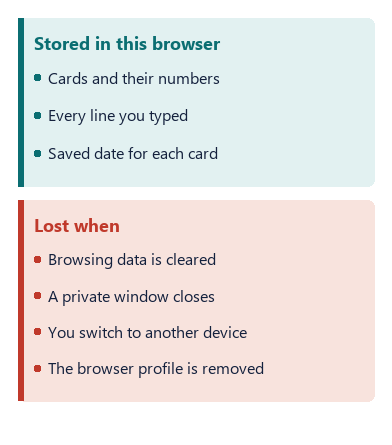
Cards sit in this browser's local storage, on this one device. They are not sent to us or to anyone else; this site has no account system and no database. That makes the card file private, and it also makes it fragile.
Clearing your browsing data deletes the cards. A private or incognito window may refuse to store them at all, and the card maker will tell you when that happens. A card saved on your laptop will not appear on your phone.
So treat the browser card file as a working copy. Once a card is complete, or at least once the order is placed, copy it as text into somewhere you back up: a notes app, an email to yourself, a document in a cloud folder. The text version keeps every line and the card number, so you can match it back to photos and screenshots later.
Removing a card from the list deletes it from this browser only. Copies you pasted elsewhere stay where you put them.
Keeping cards outside the browser
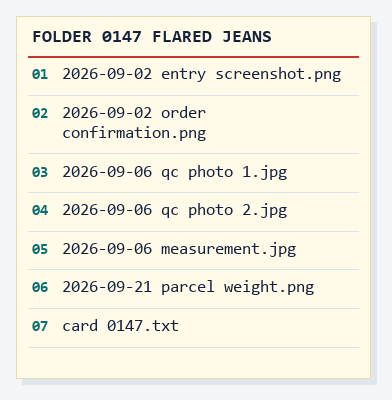
A card works best with the files that support it. Give each find a folder named after its card number and item, and put three kinds of file in it: a screenshot of the catalog entry, the warehouse photos, and any messages with the agent about that item.
Name files so they sort in the order things happened: the entry screenshot first, the photos next, the parcel last. Put the date in the name, year first, so that a folder listing reads like a timeline. When you need to show a support agent what you ordered and what arrived, the folder does the talking.
Screenshots beat links for one reason: links rot. A catalog entry can be removed, an agent's order page can stop loading, and a listing can change its photos. A screenshot taken on the day you ordered keeps the price, the option list and the seller's note exactly as they were.